
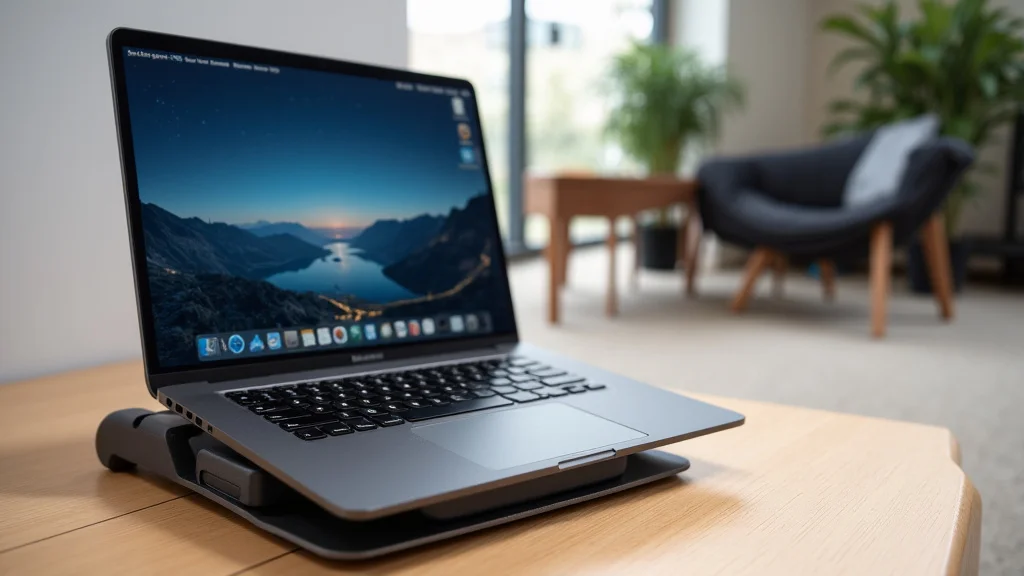
Many people wonder about the best way to use their laptops more comfortably. Sometimes, setting up a laptop stand can seem a bit confusing at first. You might wonder if it really makes a difference or how to pick the right one.
Don’t worry, it’s simpler than you think! This guide will show you exactly what to do, step by step. Get ready to make your workspace much better.
Key Takeaways
- A laptop stand can help improve your posture and reduce neck strain.
- Different types of laptop stands suit various needs and budgets.
- Proper placement of a laptop stand is key for ergonomic benefits.
- Choosing the right material and features affects durability and portability.
- Using a laptop stand can enhance your overall computing experience.
What Is A Laptop Stand
A laptop stand is a simple device designed to elevate your laptop screen to a more comfortable viewing height. This small change can have a big impact on how you feel while working or studying. It’s like giving your laptop a little boost to make your desk setup work better for you.
Many people find that their neck and back feel much better after using one.
Think about how you usually use your laptop. Most likely, it sits flat on a desk. This means you often have to hunch over, looking down at the screen.
This posture can lead to aches and pains over time. A laptop stand solves this problem by lifting the laptop up. This allows you to sit up straighter, which is much healthier for your body.
Types Of Laptop Stands
There are many kinds of laptop stands available. Some are basic and just prop up your laptop. Others are more advanced and can be adjusted in many ways.
Some are made of metal, while others use wood or plastic. The variety means you can find one that fits your specific needs and style.
Fixed stands are the simplest. They hold your laptop at one set height. This is good if you know exactly how high you want your screen.
Adjustable stands let you change the height and angle. This gives you more flexibility to find your perfect comfort level. Some stands also have built-in features like fans to keep your laptop cool.
Others are designed to be very portable, folding up small enough to fit in a bag.
Materials And Durability
The material a laptop stand is made from affects how long it lasts and how it looks. Metal stands, like aluminum or steel, are usually very strong and durable. They can hold heavier laptops without bending.
These stands often have a sleek, modern look that fits well in many offices.
Wood stands offer a warmer, more natural aesthetic. They can be a good choice if you prefer a softer look for your workspace. Plastic stands are often the most affordable option.
They can be lightweight and come in many colors. However, cheaper plastic might not be as strong or long-lasting as metal or good quality wood. When choosing, consider how much weight the stand needs to support and how it will be used.
Ergonomic Benefits Of A Laptop Stand
Using a laptop stand is great for your body. When your laptop is raised, you can look straight ahead at the screen. This means your head and neck are in a neutral position.
This helps prevent neck strain, shoulder pain, and headaches. It’s a simple way to make your work habits healthier.
Good posture is important for long-term health. Hunching over a laptop can lead to bad posture habits. A stand encourages you to sit up tall.
Your spine stays aligned, and your back muscles don’t have to work as hard. This can make a big difference, especially if you spend many hours at your computer.
Improved Posture
When your laptop is at the right height, you naturally sit up straighter. Your shoulders relax, and your back is supported. This position reduces the strain on your spine.
- Reduces slouching and hunching over the screen.
- Promotes a natural curve in the spine.
- Decreases pressure on the lower back.
Good posture not only feels better but can also boost your energy levels. When your body isn’t fighting against bad positioning, you have more energy for other tasks. It’s like getting a little boost just by sitting correctly.
Reduced Eye Strain
Raising the screen also brings it closer to your eye level. This means you don’t have to look down as much. Less downward gazing helps reduce the effort your eyes need to make.
This can lead to less eye fatigue and dryness. Many people report feeling less strain after a long day of computer work.
- Brings the screen closer to eye level.
- Minimizes the need to tilt your head down.
- Helps prevent dry eyes and blurry vision.
If you wear glasses, finding the right screen height can also improve your visual comfort. It ensures you’re looking at the screen through the part of your lenses that works best for distance viewing.
Alleviation Of Neck And Shoulder Pain
The most common complaint from laptop users is neck and shoulder pain. This happens when you crane your neck forward to see the screen. A laptop stand helps eliminate this by positioning the screen directly in front of you.
Your neck muscles can finally relax.
- Prevents forward head posture.
- Eases tension in the neck and upper back.
- Reduces the risk of chronic pain.
Imagine working without that constant ache in your neck. A laptop stand makes this possible by creating a more ergonomic setup. It’s a simple solution for a very common problem.
Choosing The Right Laptop Stand
Deciding on a laptop stand involves thinking about a few key things. What will you use it for? Where will you use it?
How much do you want to spend? Answering these questions will help you find the perfect stand for your needs. There isn’t one ‘best’ stand for everyone, but there’s a best one for you.
Consider how you work. Do you move around a lot, or do you have a dedicated desk space? This will influence whether you need something lightweight and portable or a more sturdy, permanent fixture.
Also, think about the size of your laptop. Some stands are designed for specific sizes, while others are more universal.
Portability And Weight
If you travel often or move between different workspaces, a portable laptop stand is essential. These stands are usually lightweight and foldable. They can easily fit into your laptop bag.
They are made from materials like aluminum or sturdy plastic to keep the weight down.
- Folds compactly for easy transport.
- Made from lightweight but strong materials.
- Quick to set up and take down.
A portable stand means you can have an ergonomic setup anywhere you go. This is great for students who study in different places or professionals who work from coffee shops.
Adjustability And Versatility
For maximum comfort, an adjustable laptop stand is often the best choice. You can fine-tune the height and angle to match your body and desk. Some stands can even be adjusted to a standing desk height, offering even more ergonomic options.
- Allows customization of screen height and angle.
- Can often be used in sitting or standing positions.
- Adapts to different user preferences and needs.
This flexibility means the stand can grow with you. As your needs change or you try different working positions, an adjustable stand can still provide the support you need.
Stability And Build Quality
A good laptop stand needs to be stable. It should hold your laptop securely without wobbling. Look for stands with a solid base and good rubber grips.
These grips prevent your laptop from sliding off and also stop the stand from moving on your desk.
- Ensures the laptop stays securely in place.
- Prevents the stand from slipping on smooth surfaces.
- Supports the weight of your laptop without bending.
The build quality is also important for longevity. A well-built stand will last much longer. Check reviews and product descriptions for information on materials and construction.
A sturdy stand is a worthwhile investment in your comfort and health.
Setting Up Your Laptop Stand For Best Results
Once you have your laptop stand, setting it up correctly is key. It’s not just about putting the laptop on top. You need to think about how it fits with your chair, desk, and keyboard.
The goal is to create a balanced ergonomic setup.
Most laptop stands are designed to lift the laptop’s screen. This means you’ll likely need an external keyboard and mouse. This is because the laptop’s built-in keyboard will also be raised, making it awkward to type on.
Using separate peripherals allows you to position them at the correct height for typing.
External Keyboard And Mouse
When you raise your laptop screen with a stand, the laptop’s keyboard also moves up. Typing on a keyboard that’s too high or at an awkward angle can cause wrist strain. To avoid this, use a separate external keyboard.
You can place it on your desk at a comfortable height for your arms and wrists.
- Allows for a natural typing posture.
- Reduces the risk of carpal tunnel syndrome.
- Improves overall comfort during long typing sessions.
Similarly, an external mouse allows you to position your hand and arm naturally. This helps prevent repetitive strain injuries. Together, the external keyboard and mouse complete your ergonomic setup with the laptop stand.
Screen Height And Distance
The ideal screen height is so the top of your screen is at or slightly below eye level. This is what the laptop stand helps achieve. The distance from your eyes to the screen should be about an arm’s length away.
This distance helps reduce eye strain.
- Positions the top of the screen at eye level.
- Maintains an appropriate viewing distance.
- Minimizes head and neck movement.
Adjust the stand until the screen is at this perfect spot for you. You might need to experiment a little to find what feels best. Small adjustments can make a big difference in comfort.
Chair And Desk Alignment
Your chair and desk also play a role. Your feet should be flat on the floor, and your knees should be at a 90-degree angle. Your desk should be at a height that allows your arms to rest comfortably.
The laptop stand works in conjunction with these elements to create a complete ergonomic workspace.
- Supports a neutral spine position.
- Allows arms and wrists to relax.
- Ensures overall body alignment.
When all these elements are aligned, your body is in a healthy, supported position. This makes working for extended periods much more comfortable and less tiring.
Using A Laptop Stand For Cooling
Many laptop stands offer an added benefit: better cooling. Laptops generate heat when they run, especially during intensive tasks. This heat can slow down your computer and shorten its lifespan.
Some stands are designed specifically to help with this.
The simple act of lifting a laptop can improve airflow. By elevating the device, you allow air to circulate underneath it more freely. This helps dissipate heat that would otherwise get trapped.
This is especially useful for laptops that tend to get warm.
Improved Airflow
Most laptop stands lift the laptop off the surface of the desk. This creates a gap for air to move. Heat generated by the laptop can then escape more easily.
This is a basic but effective way to keep your laptop cooler.
- Allows air to circulate freely around the laptop.
- Prevents heat from building up underneath.
- Helps maintain optimal operating temperatures.
This improved airflow can mean your laptop performs better. It’s less likely to slow down due to overheating. This is particularly helpful for tasks like gaming, video editing, or running complex software.
Stands With Built-In Fans
Some advanced laptop stands come with built-in cooling fans. These fans actively blow air onto the underside of your laptop. They provide a more powerful cooling solution than passive airflow alone.
- Actively cools the laptop with fans.
- Connects via USB to power the fans.
- Can significantly reduce laptop temperatures.
These fans are usually powered by a USB connection to your laptop. They are a great option if your laptop frequently overheats. They offer an extra layer of protection for your device.
Real-Life Example Laptops and Heat
Consider a student using an older laptop for research and writing papers. The laptop might be fine for basic tasks, but when they try to use online research tools or watch lecture videos, it starts to slow down and get noticeably hot. Simply placing it on a basic metal laptop stand allows for much better airflow.
The student might notice that the laptop no longer slows down during these activities. The fan runs less often, and the casing feels cooler to the touch. This extends the laptop’s usability and makes the study experience much smoother.
Another example is a graphic designer who relies on their laptop for photo editing. Editing large image files is very demanding. Without proper ventilation, their laptop’s performance can drop significantly as it tries to manage the heat.
Using a laptop stand with good airflow, or even one with cooling fans, can mean that complex edits are processed much faster. The designer can complete their work more efficiently. The laptop’s internal components also experience less stress, potentially leading to a longer lifespan.
Common Myths Debunked
Myth 1: Laptop stands are only for people with back pain.
Reality: While laptop stands are excellent for alleviating back and neck pain, they benefit everyone. They promote better posture, reduce eye strain, and improve overall comfort for anyone who uses a laptop regularly, not just those already experiencing discomfort.
Myth 2: All laptop stands are expensive.
Reality: There is a wide range of laptop stands at different price points. You can find basic, effective stands for a very affordable cost. More advanced features like adjustability or built-in fans will increase the price, but simple, functional options are readily available.
Myth 3: Laptop stands make typing difficult.
Reality: When using a laptop stand, it’s recommended to use an external keyboard and mouse. This setup allows for proper ergonomic positioning of your hands and wrists. The stand itself lifts the screen, and the external peripherals ensure comfortable typing and mousing.
Myth 4: You need a special laptop to benefit from a stand.
Reality: Any laptop can benefit from a stand. The primary purpose is to improve your ergonomic setup by raising the screen to a better viewing height. This is beneficial regardless of your laptop’s age, model, or specifications.
Frequently Asked Questions
Question: Do I need an external keyboard if I use a laptop stand?
Answer: Yes, it is highly recommended to use an external keyboard and mouse with a laptop stand. This allows you to position your typing tools at an ergonomic height, preventing wrist strain and improving comfort.
Question: Can a laptop stand help my laptop run faster?
Answer: While a laptop stand doesn’t directly increase processing speed, improved airflow can prevent overheating. When laptops overheat, they slow down to protect themselves. By keeping the laptop cooler, a stand can help it maintain its optimal performance.
Question: Are metal laptop stands better than wooden ones?
Answer: Metal stands are often more durable and can be lighter for their strength, offering a sleek look. Wooden stands offer a warmer aesthetic and can be very sturdy. The “better” choice depends on your personal preference for style, weight, and durability needs.
Question: How high should my laptop screen be when using a stand?
Answer: The top of your laptop screen should ideally be at or slightly below your eye level. This allows you to look straight ahead without tilting your head down, which is crucial for good posture.
Question: Can I use a laptop stand while standing?
Answer: Yes, some laptop stands are designed to be adjustable to standing desk heights. These are called standing desk converters or adjustable laptop stands and allow you to alternate between sitting and standing work positions.
Conclusion
Using a laptop stand is a simple yet effective way to improve your workspace comfort and health. By elevating your screen and promoting better posture, you can reduce strain and discomfort. Different types of stands offer options for every need, from portability to enhanced cooling.
Setting up your stand with an external keyboard and mouse ensures a fully ergonomic experience.